What Is a Node in Godot?
What Is a Node in Godot?
When I migrated from Unity to Godot, the hardest thing to understand was why I couldn't put several scripts on a single object, the way I used to.
Well, in Godot things work differently: those responsibilities are split across nodes, and each node can only have one script. So what exactly is a node in Godot?
Everything Is a Node
In Godot, anything can be a node a sound player, a sprite renderer, a piece of physics logic. The engine ships with a whole set of base nodes for you to use in your game. The goal is for a node to have one encapsulated responsibility, limited to its own scope, and able to work on its own.
Child nodes are a lot like a MonoBehaviour in Unity, but with a few differences and some recommendations about how they should communicate with other nodes.
And we can build a tree of nodes, which we call a scene!
What Is a Scene?
I find this name pretty confusing, because a scene can be used in more than one way. One is to create a new node made up of several nodes inside it a Player, for example. The other is to build an actual scene of your game, like a level.
In a scene you need to define a root node. That's the node that holds the script exposed to the outside world, and it's also the one that controls its children.
Using the Player example, its root node would usually be a CharacterBody2D, since it needs physics. Inside it you'd have children like Sprite2D to render the player's visuals, CollisionShape2D to define the player's collision, AudioStreamPlayer2D to play the player's sounds, and so on.
Parents and Children
A good way to think about it is that the parent node is usually a grouper. It communicates with its children, and the children just obey. A child should rarely reach for its parent what it can do is emit a signal, and the parent is responsible for orchestrating its children.
Here's an example scenario:
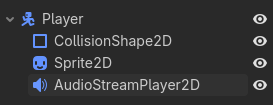
In this example, never write a script for the Sprite2D that grabs a reference to the Player and reads a variable from it to set its own texture. That's making the child call the parent. Instead, the parent (Player) is the one that should set its child's texture.
Bad example:
Sprite2D
extends Sprite2D

@export var player: Player

func _ready():
    texture = player.texture
Good example:
Player
class_name Player extends CharacterBody2D

@export var texture: Texture2D

@onready var sprite = $Sprite2D # Since a parent always knows its children, you can look them up by name

func _ready():
    sprite.texture = texture
A parent always knows who its children are; children are never sure who their parent is
And this applies to everything. For another example, let's add a Controller node that will handle the player's input:
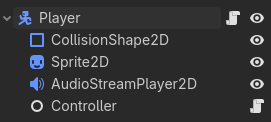
The Controller isn't going to grab that information and just assign it to a variable over in the Player, because it's the child and it isn't sure who its parent is. That's what signals are for!
Controller.gd
extends Node

var direction: Vector2 = Vector2.ZERO

signal attacked()

func _process(_delta: float):
    direction = Input.get_vector("left", "right", "up", "down")
    if Input.is_action_just_pressed("attack"):
        attacked.emit()
As you can see, this controller script never calls the player. It reads the input and stores it internally. Some inputs, like an attack, need to fire on the exact frame the button is pressed that's where the signal comes in. On the player side, we can do this:
Player.gd
class_name Player extends CharacterBody2D

@onready var controller = $Controller

func _ready():
    controller.attacked.connect(attack) # This is how we catch single-frame inputs

func _process(_delta: float):
    movement(controller.direction) # And this is how we read continuous input values

# movement and attack implementations omitted
Conclusion
Once you have this mental model of what nodes are, planning your game's architecture gets a lot easier, and you start thinking through all the nuances of each node's responsibilities. Personally, I like breaking logic into separate pieces and attaching them as children.
For example, I use a Forces node on my player. It calculates and stores every force being applied and where each one comes from. The Player doesn't need to know any of that it just reads the result.
Of course, everything I covered here is best practice and it will help you while developing, but none of it is a mortal sin. Inside a self-contained scene, where you control both sides, reaching for the parent isn't going to destroy your project. The problem shows up when a child depends on a parent it doesn't control that's when it stops being reusable.
- Gustavo Maia Paes